
THE SHORT ANSWER
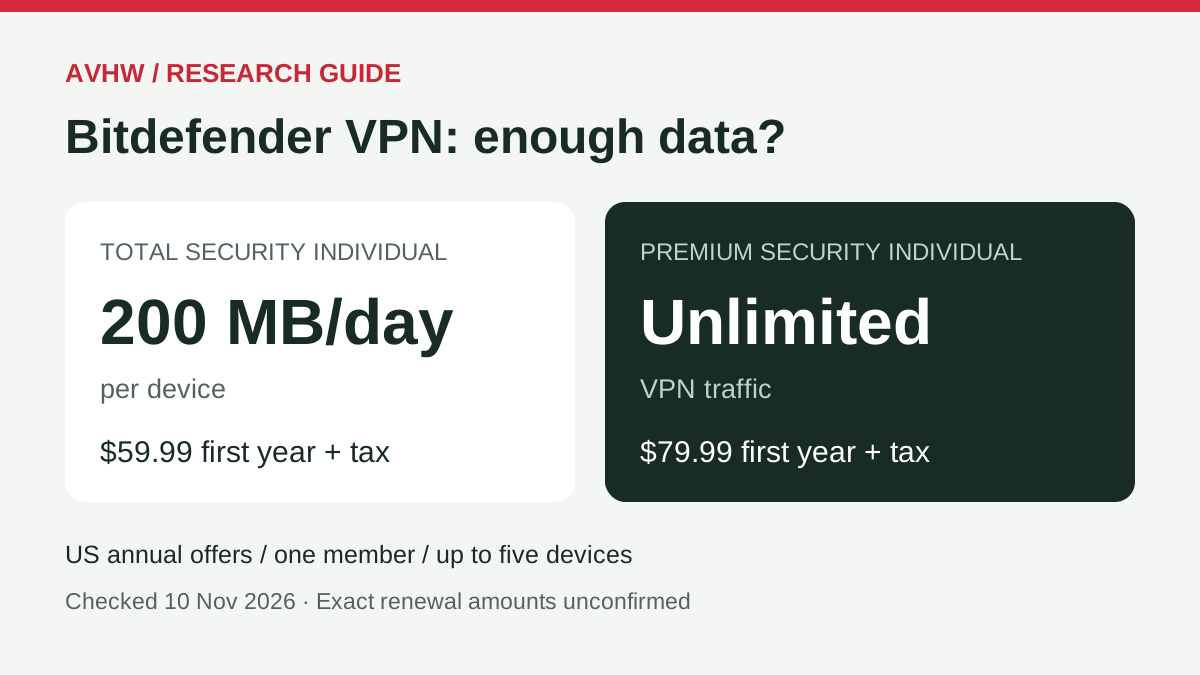
200 MB a day can fit occasional light use. For uninterrupted sessions, compare unlimited traffic and the full recurring cost before upgrading.
What we researched and what remains untested
Research scope and evidence types
This guide answers one narrow question: should a US buyer keep the VPN included with Total Security or pay for more VPN capacity? It is a documentation-based research review, not an AVHW hands-on VPN test. We rechecked official US annual Individual offers and support documentation on 12 November 2026, reviewed an accessible vendor video and its timestamped transcript, and examined AV-TEST’s original antivirus report.
Our comparisons hold the advertised account type and device allowance constant. We calculate hypothetical data consumption and the difference between two first-year prices; neither calculation is a measured result. We have not tested VPN throughput, connection reliability, streaming access, DNS leaks or cancellation processing. The current offer, the older video and the lab report describe different scopes and dates.
Separate the four questions hidden inside “VPN included”
A useful review must distinguish four decisions: whether the subscription includes a VPN, how much traffic the entitlement permits, which service controls exist on your platform, and whether paying for another tier solves your actual problem. A yes to the first question does not settle the other three. This guide therefore treats documented rules, an older interface demonstration, independent antivirus evidence and our calculations as separate inputs.
What would change our conclusion?
A different allowance in the exact order summary, a customer-specific upgrade offer, a change in how your app records usage, or a known renewal amount could change the recommendation. A general award for the antivirus engine would not resolve a data-cap problem. We have not measured the VPN’s speed or audited its privacy implementation, so this article does not rank it against competing VPNs on those grounds.
The allowance is per device, per day
What the current rule says
Bitdefender’s FAQ specifies 200 MB per day per device for Standard VPN, with automatic server selection. Premium VPN removes the traffic cap and allows server choice. The reset is midnight UTC, which is 7 PM or 8 PM in New York depending on daylight saving time. Waiting for midnight on your own clock can therefore be misleading. [1]

- Each device has a 200 MB daily allowance; extra devices do not create a larger allowance on one laptop.
- The reset boundary is UTC. Check your local time difference before expecting another allowance.
The purchasing consequence is simple: ask whether one device needs a long protected session on a particular day. A five-device antivirus allowance does not describe the VPN data available to one laptop. Similarly, multiplying 200 MB by 30 days produces 6,000 MB arithmetically, but that monthly sum does not describe the daily limit you encounter during a single session.
If your VPN stops after a small amount of use, check the allowance and the subscription signed into the VPN app before diagnosing a faulty internet connection. If you paid for unlimited traffic but the app still shows a daily quota, reconcile the account and activation with official support before paying again.
A device count is not a larger bucket on one device
Imagine a household with a laptop used for work and a phone used occasionally while traveling. If the laptop is the device that repeatedly runs out of allowance, adding another eligible device is not a substitute for a larger allowance on that laptop. The buying question belongs at the device and session level. Do not divide a household’s total advertised capacity by the number of people and conclude that the busy laptop has more available traffic.
Use the reset rule to troubleshoot, not to promise uptime
A daily reset tells you when another allowance starts; it does not tell you how long a call, upload or browsing session will last. Your app’s traffic counter is the useful observation. If a session is important enough that an interruption would be costly, plan around capacity that fits the whole session rather than waiting for a clock boundary to rescue it. This is a continuity recommendation, not a claim that a VPN prevents every online threat.
How quickly could 200 MB run out?
Transparent calculations and limits
The examples below are deliberately controlled calculations. They use decimal units, a constant total traffic rate through the tunnel and the formula seconds = 200 × 8 ÷ Mbps. They exclude protocol overhead and do not represent a measured app, video resolution or Bitdefender speed.

- At an assumed 1 Mbps: 1,600 seconds. At 5 Mbps: 320 seconds. At 10 Mbps: 160 seconds.
- The rate is assumed traffic use, not your broadband package speed. Background traffic changes the result.
| Assumed traffic rate | Time before 200 MB is consumed |
|---|---|
| 1 Mbps | 26 minutes 40 seconds |
| 5 Mbps | 5 minutes 20 seconds |
| 10 Mbps | 2 minutes 40 seconds |
A short text-focused task may fit; continuous media or background synchronization can change the answer quickly. Connection speed alone does not tell you consumption: an idle fast connection can transfer little, while background activity can use data without a foreground video. Observe the VPN app’s traffic counter during your normal work instead of using a generic minutes-of-browsing promise.
Our decision rule: if interruption would disrupt work or a call, do not build that session around a small daily quota. If your use is occasional and you can check the counter, try the included allowance before buying an overlapping subscription. Neither rule assumes that all online activity requires the same privacy setup.
Why minutes of “normal browsing” would be misleading
The same browsing label can mean reading a cached text page, loading image-heavy pages, joining a call, or opening a site that starts video automatically. Those activities do not consume the same amount of traffic. We therefore do not turn a small daily allowance into a fixed number of “safe browsing hours.” The calculation above exposes its assumptions so you can change the rate and see why the answer changes.
A repeatable usage worksheet you can run yourself
- Record the device, operating system, VPN app version, account and entitlement shown in the app. Note the local time and UTC offset.
- Write down the displayed traffic counter before a normal, harmless work session. Keep protection settings unchanged.
- Perform the task you actually need, with its usual background apps. Record the end counter and elapsed time.
- Repeat on another ordinary day. Mark whether a backup, download or update happened; do not silently discard an inconvenient result.
- Decide whether the observed pattern fits the allowance with room for variation. Treat the result as your own usage observation, not an AVHW benchmark.
This worksheet cannot establish leak protection, no-logs practices or speed superiority. Its purpose is narrower: finding out whether your ordinary activity repeatedly collides with the limit. A single quiet session should not be extrapolated to a travel day containing large uploads.
Watch the official explanation, with evidence limits
Creator, date and verified timestamps
Watch Bitdefender VPN Overview on YouTube. Creator: Bitdefender’s verified channel. Published: 21 September 2023. Length: approximately four minutes. The source, timestamped captions and playback were verified on 10 November 2026. The dated demonstration remains distinct from current written offer terms. This is the vendor’s own promotional demonstration, not an independent review; no outside sponsor is identified in the description we inspected. Its interface and features may differ from your current app.
- 00:34–00:47: distinguishes standalone and bundled availability and describes Premium traffic and server selection.
- 01:21–01:26: shows choosing a location.
- 01:58–02:01: cautions that features and arrangement vary by operating system and version.
These points explain the product distinction. Use current written terms for today’s quota and price; the video does not establish them. [4]
Use the video for the question it actually answers
The linked segments help a reader recognize the distinction between the included service and Premium controls. They do not show the exact point at which every present-day app handles quota exhaustion. We have therefore not inserted a fabricated upgrade-popup screenshot. If the current interface differs, use the product’s current help documentation rather than searching for a button that happened to exist in a 2023 recording.
Expert evidence: antivirus quality does not settle the VPN question
Independent findings and their scope
Independent testing institute AV-TEST evaluated Total Security 27.0 on Windows 11 Professional, English 64-bit, in July–August 2026. Original report 261405 awards 6/6 in protection, performance and usability. Its method used default settings, permitted updates and cloud queries, and compared 15 home security products. These are the laboratory’s category scores, not AVHW ratings. [5]
Our interpretation: this is useful evidence for retaining Total Security on a Windows shortlist. It does not measure VPN traffic allowances, VPN speed or privacy, establish Mac or mobile results, or prove that a more expensive privacy bundle improves malware protection. Upgrading to solve a data cap and changing antivirus because of poor protection are separate decisions. A strong antivirus result should not become a reason to buy VPN capacity you will not use.
Why we include an antivirus report in a VPN-limit guide
The report addresses the adjacent decision of whether keeping the underlying suite is reasonable while solving the VPN limitation separately. It is not a VPN endorsement. Think of the decision as two independent requirements: protection software that fits your devices, and a connection service whose capacity and controls fit your sessions. One product bundle may satisfy both, but the supporting evidence for one component cannot simply be transferred to the other.
US costs: the full annual payment and the unresolved renewal
Matched US annual offers
The checked US Total Security Individual offer covers one member and up to five devices across Windows, macOS, Android and iOS. Its annual first-year price is USD 59.99 before applicable sales tax, with Standard VPN. [2] The corresponding Premium Security Individual annual offer is USD 79.99 before applicable sales tax, also one member/up to five devices, and includes unlimited VPN traffic. Feature availability still depends on platform. [3]

- Total Security Individual: $59.99 for the first year. Premium Security Individual: $79.99. Each covers up to five devices, before tax; the first-term gap is $20.
- A renewal reference must be verified separately; a first-year price cannot establish a two-year ownership total.
Large-print payment explanation
Total Security: pay $59.99 for the first year, plus tax.
Premium Security: pay $79.99 for the first year, plus tax.
The difference between these two advertised annual offers is $20 for the first year. Dividing that difference by 12 gives about $1.67 per month. That is a comparison only: it is not an offer to pay $1.67 each month.
Renewal: exact dollar amounts were not confirmed for these offers. Do not assume year two costs the same. We cannot give a reliable two-year ownership total without those renewal figures.
These are reference offers, not a guaranteed upgrade quote for an existing customer and not an AVHW-exclusive Black Friday deal. Changing an existing subscription may involve different account terms; compare the actual upgrade quote with the remaining prepaid term before acting.
The Total Security page states recurring automatic renewal at the applicable price, which may be higher, with prior email notice. It provides cancellation through Bitdefender Central or support and a refund request within 30 days of initial purchase or automatic renewal. [2] Check the selected seller’s actual order summary, keep a copy of the terms and distinguish stopping the next renewal from requesting a refund for a charge already made.
New purchase, upgrade and renewal are different transactions
A new customer comparing two annual checkout totals is in a different position from someone with eight prepaid months left on an existing license. The latter needs an actual account quote and a clear statement about the remaining term. A $20 difference between two public first-year offers does not tell us whether a vendor will credit unused time, extend the expiry date or start a separate subscription. We do not assume any of those outcomes.
The quote to save before you pay
Keep a record of the named plan, country, currency, term, member and device counts, full charge, tax line, next billing date and the seller that will collect the renewal. Write “not confirmed” next to an absent renewal amount rather than substituting a crossed-out marketing price. Also record whether the VPN is part of the suite or a separate subscription. That determines which payment and cancellation record you need to track.
Canceling a future bill is different from refunding a past one
There are two distinct questions to ask support: “Will another payment be taken?” and “Can the payment already taken be returned?” The evidence needed is different. Keep the order number and purchase or renewal date when making a refund request. If a separate VPN subscription exists, check that subscription as well as the antivirus renewal setting. Deleting an application is not a substitute for confirming the billing record with the seller.
The official auto-renewal help page explains the cancellation route. Follow the route applicable to your seller and account; the order summary remains the relevant record of what you bought.
Which route fits your situation?
Keep, upgrade or compare another service
- Occasional use, no repeated quota problem: start with the included service. Track one normal session rather than buying on the word unlimited.
- Daily sessions, matching five-device Individual needs: compare Premium Security’s complete first-year payment with Total Security plus the actual standalone VPN quote. The $20 difference above is between two new annual bundle offers, not the price of every standalone upgrade.
- Already paid for antivirus: consider a separate VPN before replacing the whole suite. Bitdefender describes standalone Premium VPN as a separate subscription; an active VPN subscription does not itself mean your antivirus subscription remains active. [1]
- Already have another VPN: count its remaining term and cancellation cost. Paying for a second service needs a concrete benefit such as a needed platform or location, not just a longer feature list.
For a VPN-led alternative, our Surfshark Antivirus research review explains the distinction between VPN and antivirus coverage. For a competing antivirus bundle, use Norton vs Bitdefender. Those are comparison starting points, not claims that a competing VPN is faster or more private; that would need matched VPN tests we have not conducted.
Three scenarios, three different choices
| Situation | First option to examine | What could reverse that choice? |
|---|---|---|
| Occasional short task | Try the included allowance and record real usage. | Repeated exhaustion, a required server location, or an interruption-sensitive task. |
| New buyer with sustained sessions | Compare a complete unlimited bundle with the suite plus a standalone service. | An unclear renewal, wrong device/account model, or a service requirement the bundle does not meet. |
| Existing paid VPN and antivirus | Check what is already covered before buying another license. | A demonstrated gap in platform support, required controls, or renewal economics. |
The examples deliberately do not force every reader toward the most expensive bundle. Someone already satisfied with a paid VPN may gain little from a second unlimited entitlement. Someone whose work keeps hitting the daily cap may benefit even if they do not use every other bundle feature. A lower first-year total is useful only after the required service, device coverage and subsequent bill are understood.
Our decision and a checkout checklist
Conditional recommendation and checkout actions
Keep Total Security when its protection and platform coverage meet your needs and the daily VPN cap rarely interrupts you. Consider an unlimited option when repeated quota exhaustion is the actual problem and the full ongoing price is acceptable. For a new US five-device Individual buyer, the checked first-year bundle gap is small enough to examine; an unknown renewal means it is not yet proof of long-term value.
- Match the plan, member count, devices and operating systems to your household.
- Check the current quota in your app and identify the account that owns the subscription.
- Write down the entire amount due today, currency, tax, term and seller.
- Find the exact renewal charge and automatic-renewal controls. If the charge is unclear, obtain it before committing.
- Save the refund deadline and verify whether a standalone VPN would duplicate an existing service.
For broader product coverage, return to our Total Security review. For seasonal comparisons with both quick and large-text reading, see the antivirus offers and full-cost report; each report retains its own verification date.
Quick answers to the remaining purchase questions
- Does a five-device plan mean five times the data on my laptop?
- No. The documented Standard allowance is per device per day. Evaluate the busy device’s needs separately.
- Does a 6/6 antivirus lab score establish VPN speed or privacy?
- No. The cited Windows report measures the antivirus product in its named test conditions.
- Is the public first-year price the price to upgrade my existing license?
- It is not a confirmed account-specific upgrade quote. Get that quote before making a decision about prepaid time.
- What should I do if the renewal amount is missing?
- Ask the seller for the next charge, term and cancellation route; do not invent a long-term total from the introductory price.
A decision you can explain in one sentence
Choose the smallest combination that meets your actual session requirements and device coverage at an understood recurring cost. If you cannot explain which limit or missing control a proposed upgrade solves, collect that evidence before spending. If the limit repeatedly interrupts an important task, compare complete alternatives using the same term and household requirements.
Check the actual offer before paying
Use the official pages to match the plan and term, then read the complete charge and renewal conditions.
Check Total Security Check Premium Security →These are official product pages. AVHW may earn compensation through commercial links on our main comparison page.Sources & evidence
Official offer and quota rules rechecked 12 November 2026; the video was verified 10 November 2026. Vendor sources establish documented terms; the video is a dated vendor demonstration. The independent lab report concerns antivirus on Windows, not VPN performance. Recommendations and illustrative calculations are AVHW editorial analysis.
- Bitdefender Support: VPN FAQChecked 2026-11-12
- Bitdefender Total Security: US Individual annual offer and termsChecked 2026-11-12
- Bitdefender: VPN Overview, published 21 September 2023Checked 2026-11-10
- AV-TEST report 261405: Total Security 27.0, July–August 2026Checked 2026-11-10